

For personal trainers
A personal trainer app for your clients' food and training.
Invite clients with a QR code or a link, see what they eat on any date, adjust their targets and assign their training. Then switch to My Fitness for your own day, in the same account.
How it works
From invite to a better week, in five steps.
Your client keeps logging in their own app. You see what they share and act on it.
- 01
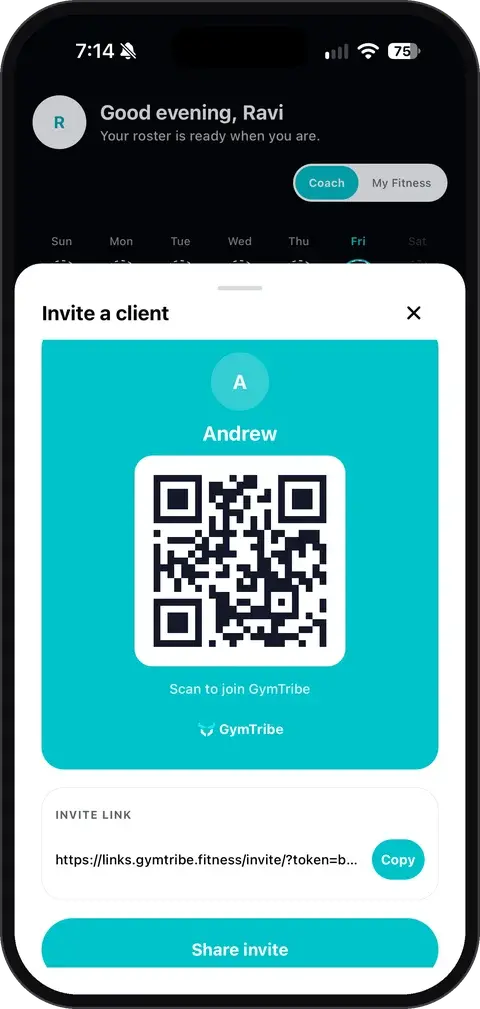
Invite by QR or link
Share a QR code or a link. Your client joins your coaching space and sees your name, logo and welcome message.
- 02
They log their day
Meals by photo, barcode or search, plus workouts, steps and sleep, in the same GymTribe app they already use.
- 03
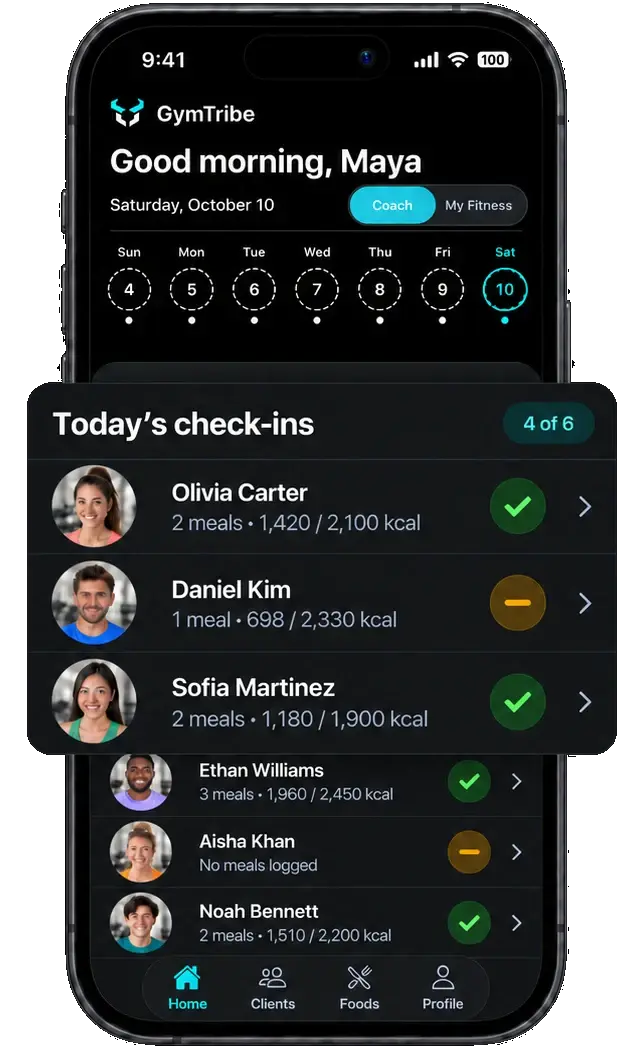
You review by date
Pick a date to see who logged meals and how each client's day compares with their targets.
- 04
Adjust and assign
Change calorie, macro and water targets, set reminders, and assign workouts and meal plans.
- 05
A brief every morning Next update
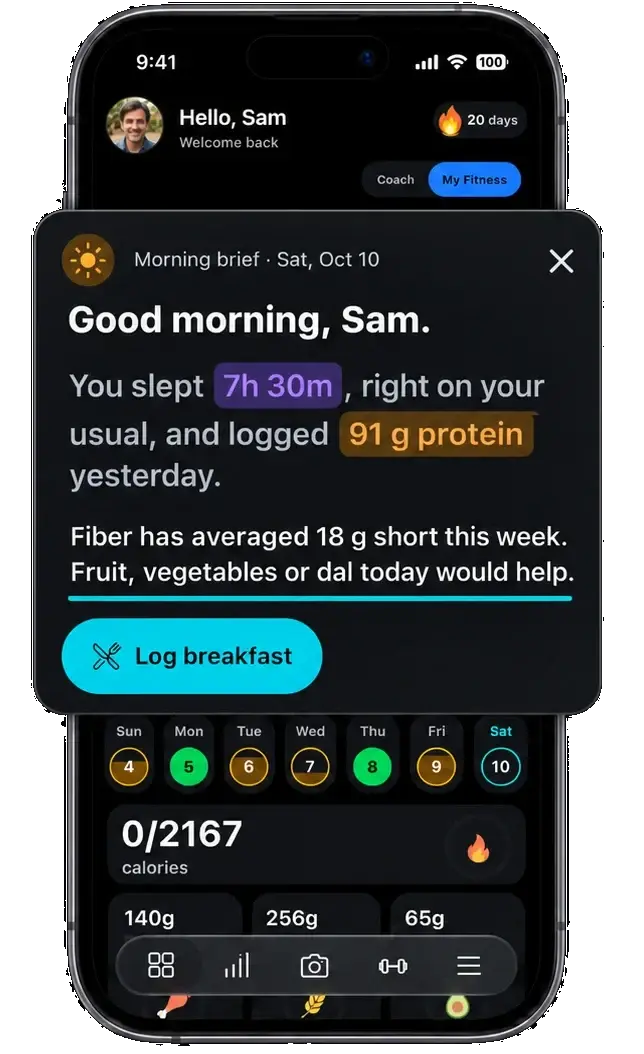
A note per client: a missed workout, skipped foods or a short night, each with a next step.
Your tools
Coach every client from one app.
Food, targets, training and your brand, in the Coach side of GymTribe.
See which clients logged meals on any day, then open a client's meals and totals against their targets. No chasing messages for food diaries.
Set each client's calorie, macro and water goals, set reminders for them, and send a push notification whenever they need one.
Build workouts and a diet for a client, keep reusable meal plans with recipes, and use templates for days you repeat.
Type a dish and a portion, such as "chicken pasta, 200 g", tap Fill with AI, and the ingredients, quantities and nutrition fill in. You review it before it is saved.
Your name, logo, accent color and welcome message, in every client's app.
Next update
Each morning, a note for every client with what changed and a suggested next step: a nudge, a swap or lighter reps.






 Noah Bennett · Short night
Privacy and AI
Clear about what we know, and who sees it.
AI gives estimates, you decide
Photo results are estimates. You review and edit them before anything is saved. Manual logging is always free.
Trainers see from the invite date
By default a trainer sees your data from the day you accept their invitation, not before.
You choose what to share
Want your trainer to see your full history? You can choose to share it. Supplement routines need your permission.
Questions trainers ask
Plain answers about plans, your clients' data and what the app does today.
Is GymTribe an app for personal trainers?
Yes. Trainers use the Coach side of the same app their clients use: invite clients, review the meals they share by date, set their targets, and assign workouts and meal plans.
Can I use GymTribe as a nutrition coaching app?
Yes. Clients log their meals from a photo, a barcode, the food catalog or by hand, and you see each meal with its photo, calories, protein, carbs, fat, fiber, sodium and sugar. You set their calorie, macro and water goals, build their diet with templates for repeated days, add custom foods, and send reminders.
Do my clients have to pay?
No. Clients you coach use GymTribe without a subscription. Their AI meal analyses come out of your trainer plan's allowance while you coach them.
Is there a free plan for trainers?
Yes. Trainer Free covers 1 client, with 10 AI photo and 30 AI text meal analyses a month for that client. Paid trainer plans cover up to 5, 25 or 60 clients; the pricing page lists them.
How do I invite a client?
Share a QR code or a link from the app. Your client joins your coaching space and sees your name, logo and welcome message.
What can I see of a client's data?
The meals they share, by date and against their targets, and their steps and sleep if they choose to share them. By default you see data from the invitation date; the client can choose to share earlier history. Supplement routines are shared only with the client's permission.
Can I set my clients' calorie and macro targets?
Yes. You can set each client's calorie, macro and water goals, and set reminders for them.
Can I assign workouts and meal plans?
Yes. Build workouts and a diet for a client, save reusable meal plans with recipes, and use templates for days you repeat.
Can I add my own foods?
Yes. Type a dish and a portion, for example "chicken pasta, 200 g", tap Fill with AI, and the ingredients, quantities and nutrition fill in for you to review before saving.
Can I reach my clients from the app?
Yes. You can send a client a push notification at any time and set reminders for them.
Can I use my own branding?
Yes. Your name, logo, accent color and welcome message appear in each client's app.
Do I need a second account for my own training?
No. Switch between Coach and My Fitness in the same account to track your own food, workouts and sleep.
What is the coach brief?
It is coming in the next app update: a note each morning for every client, such as a missed workout with a suggested nudge, skipped foods with a suggested swap, or a short night with lighter reps.
Can a family member use GymTribe to support someone?
Yes. A family caregiver can use the same coaching tools to invite someone, see the meals they share and adjust their targets.
Is there an iPhone app?
It is coming soon. Today GymTribe is on Android, and you and your clients use it through Google Play.