
For clients
What can a personal trainer see in your nutrition app?
Before you connect a trainer, it is reasonable to ask what becomes visible. GymTribe uses a private invitation and a client-controlled sharing boundary, so the coaching relationship is not the same thing as making your records public.
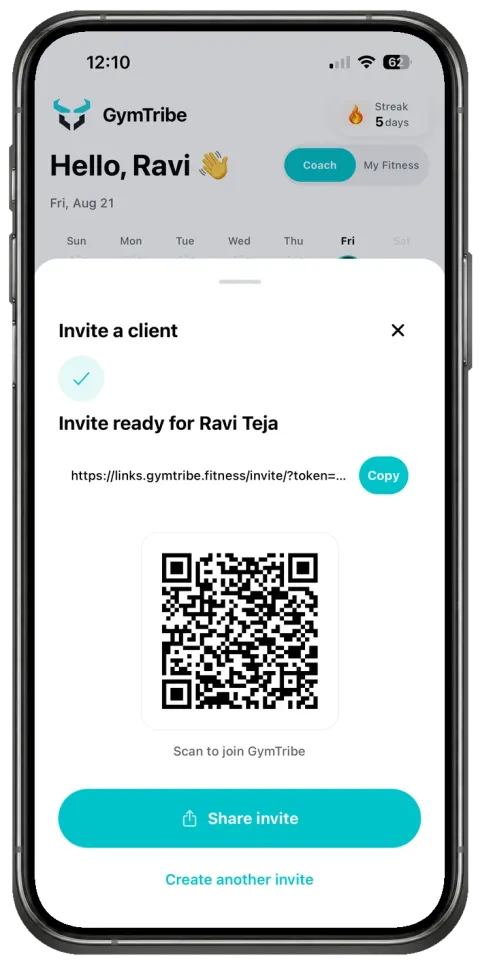
01 / The connection
The connection starts with a private invitation.
A trainer invites you through a private link or QR code. That invitation connects you to the trainer's coaching space; it is not a public profile and it does not publish your records on the open web.
The invitation screen identifies the coaching space with the trainer's name, logo, and welcome message, so you can recognize who you are connecting to before you continue.
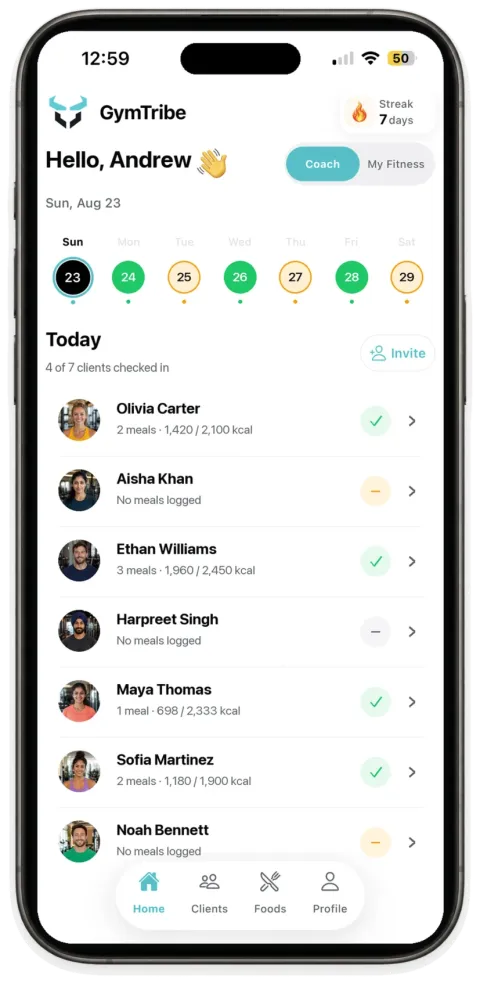
02 / The sharing boundary
Sharing begins from the invitation date by default.
Your trainer can review the records you share in the connected coaching space, including logged meals and relevant targets. Sharing starts from the invitation date by default rather than automatically exposing your complete history.
You can choose to include earlier records and can change sharing later. The exact records a trainer can review depend on what you have logged and shared.
03 / What the workspace is for
A coaching view of the records you choose to keep.
- Meals you logYour trainer can review shared meal activity by date and open the details available in your log.
- TargetsThe connected workspace can show the nutrition targets being used for your coaching context and support target adjustments.
- Trainer-managed workoutsA trainer can build a workout for you when that coaching workflow is enabled and you consent to the connection.
GymTribe is designed to make the shared records useful for coaching while keeping the relationship explicit. It is not a replacement for discussing what you are comfortable sharing with your trainer.
Important boundaries
Connected does not mean public.
GymTribe does not turn a client's nutrition log into a public feed. It also does not provide trainer-client messaging, clinical nutrition advice, or automated risk scoring. For account and data handling details, read the Privacy Policy.